Overview
The Payroll Reports module calculates labor costs based on timeclock data and scheduled hours. Use it to review wages, overtime, and labor percentage before running payroll.
Step 1: Navigate to Payroll Reports
Click Reports in the left navigation menu, then select the Payroll Reports tab at the top of the page.
Step 2: Set Date Range and Filters
Enter your Start Date and End Date for the pay period. Use the Employee filter to run the report for all employees or a specific team member.
Step 3: Choose Report Mode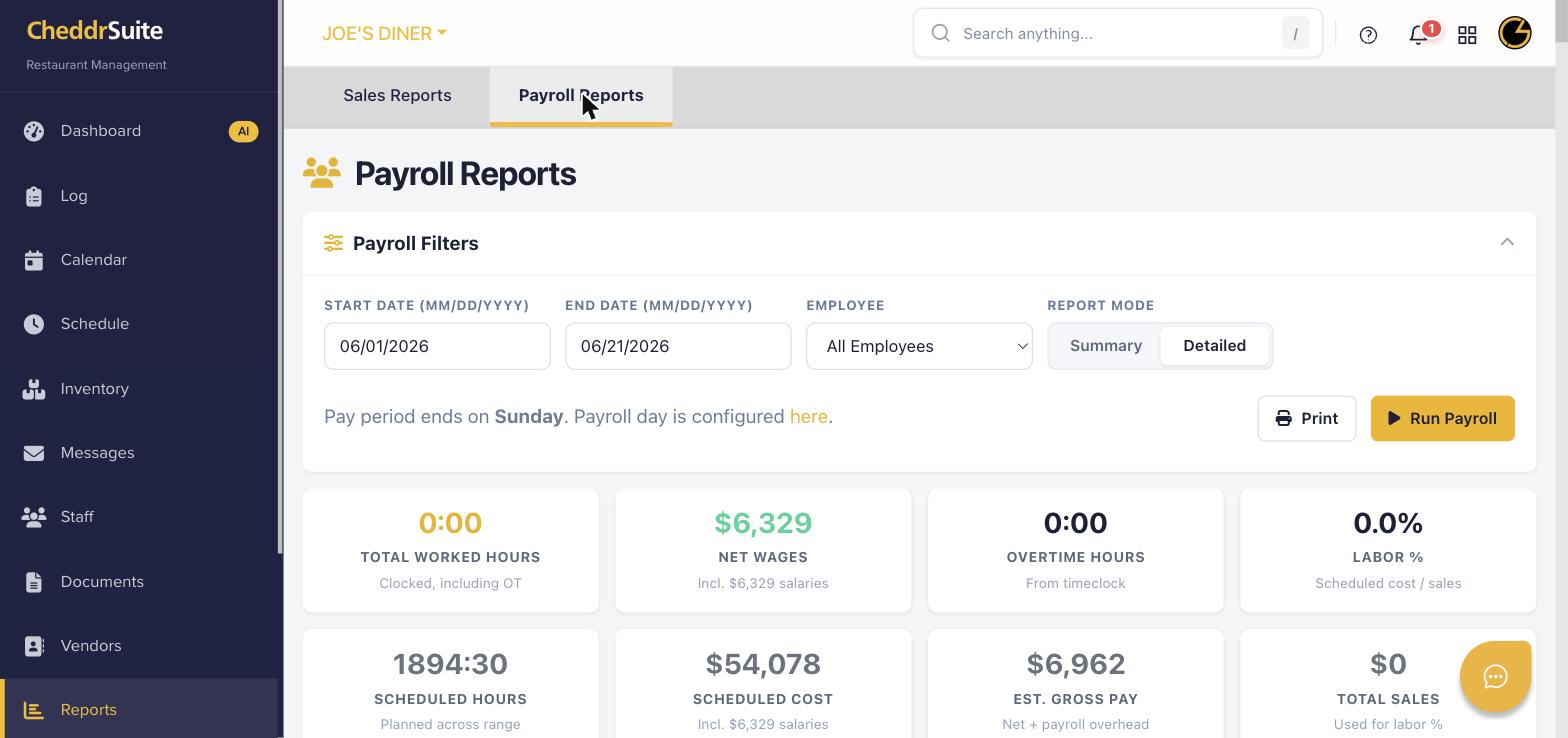
Select Summary to see totals per employee, or Detailed to see a breakdown of each clock-in/out entry. The summary shows net wages, overtime, and labor percentage.
Step 4: Run the Payroll Report
Click Run Payroll to generate the report. Review the results showing total worked hours, net wages, overtime hours, and estimated gross pay.
Step 5: Print or Export
Click Print to open a print-ready version of the payroll report. Use your browser's print dialog to save as PDF or send to your payroll provider.
Was this article helpful?
That’s Great!
Thank you for your feedback
Sorry! We couldn't be helpful
Thank you for your feedback
Feedback sent
We appreciate your effort and will try to fix the article