Overview
CheddrSuite integrates with delivery platforms like DoorDash and Uber Eats to pull order and revenue data, and 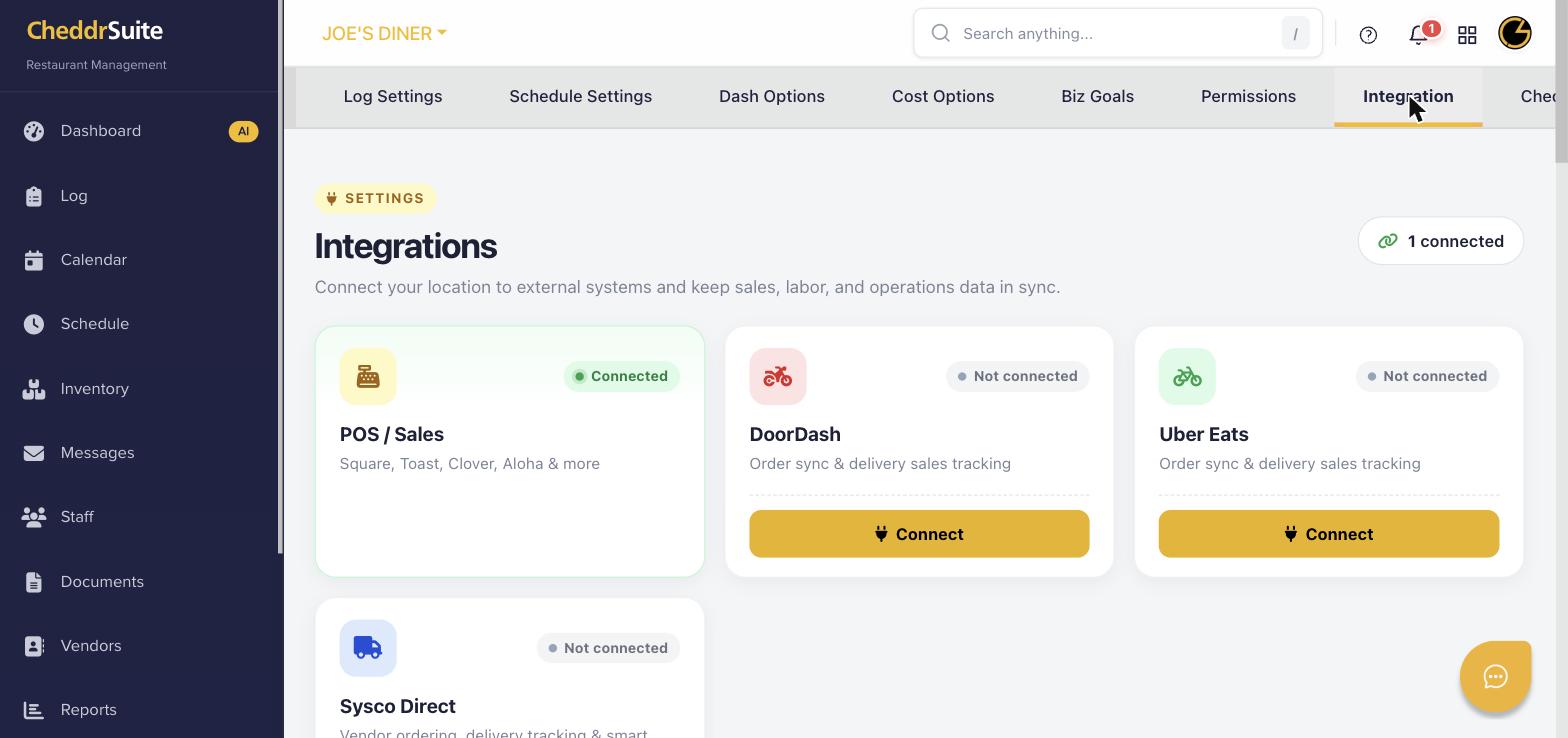 with vendor services like Sysco Direct for automated ordering. These integrations streamline your operations across all sales channels.
Step 1: Navigate to Integrations
Click the Settings gear icon in the left navigation, then select the Integration tab to view all available connection options.
Step 2: Connect a Delivery Platform
Click Connect on the DoorDash or Uber Eats card. You will be redirected to the platform's authorization page. Sign in with your restaurant's account and approve the connection.
Step 3: Connect Sysco Direct (Vendor)
Click on the Sysco Direct card and click Connect. Enter your Sysco account credentials to link your vendor ordering account. Once connected, you can manage orders through CheddrSuite.
Step 4: Verify the Connection
After connecting, each card will show a green Connected status badge. Delivery sales data will begin syncing into your reports, and vendor orders will be accessible from the Inventory section.
Step 5: Review Synced Data
Navigate to Reports > Sales Reports to confirm delivery platform revenue is appearing. Check Inventory > Purchase Orders to verify vendor order data is syncing correctly.
Was this article helpful?
That’s Great!
Thank you for your feedback
Sorry! We couldn't be helpful
Thank you for your feedback
Feedback sent
We appreciate your effort and will try to fix the article